


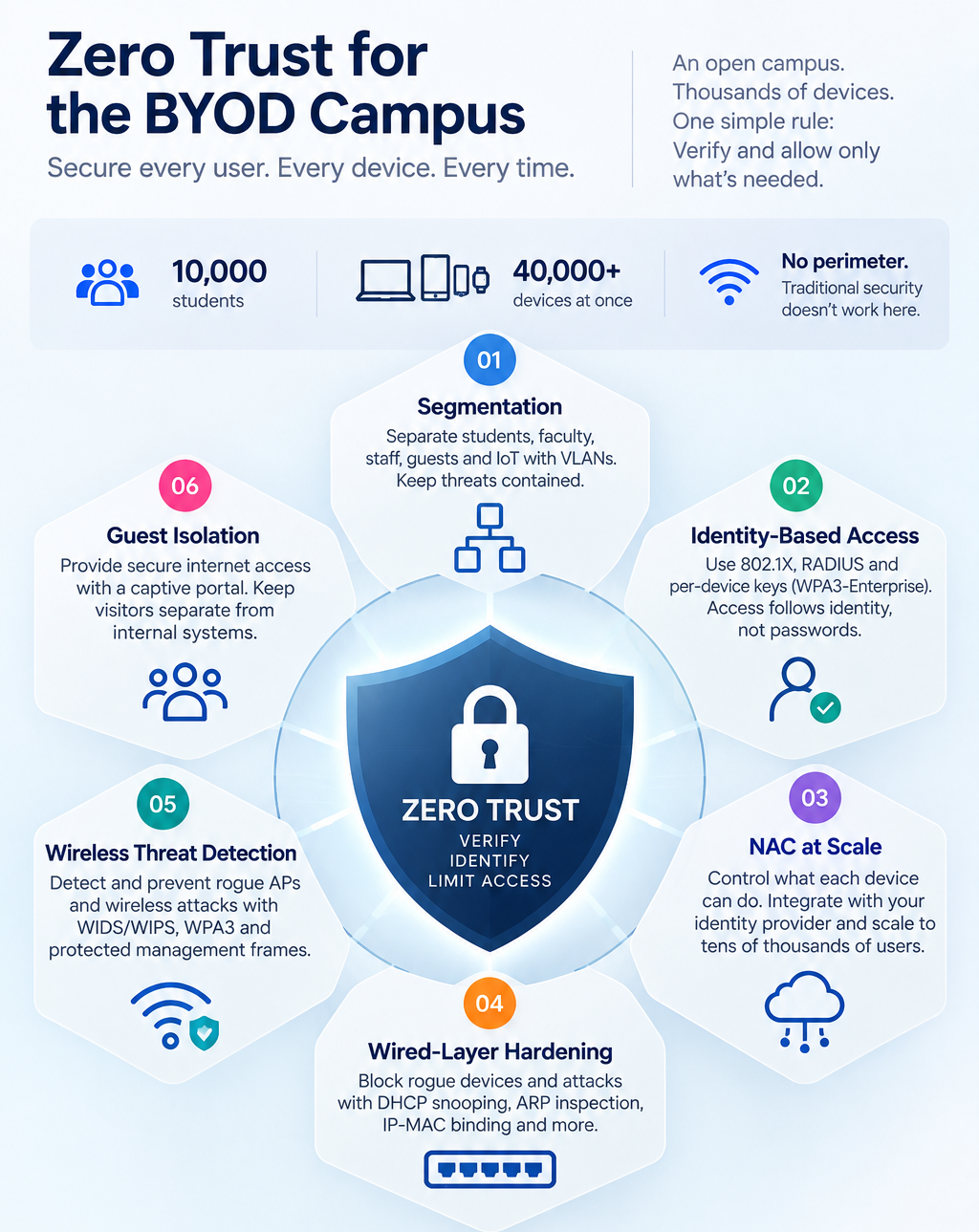
A campus is the hardest environment to secure: open by design, with students carrying five or six personal devices each and a user base that turns over every few years. On a 10,000-student education campus network that can mean 40,000 or more unmanaged devices connecting at once. The old "trust everything inside the network" model has no perimeter to defend here. Zero trust replaces it with a simple rule, verify every user and device, every time, and limit access to only what identity permits. This guide explains how to build that on a campus, layer by layer: VLAN segmentation, identity-based access, cloud NAC, wired-layer hardening, and wireless threat detection, with the specifications that make each work.
In one line: A zero-trust campus network verifies every user and device continuously and confines each to only what its identity allows, containing breaches on an open, BYOD-heavy network of tens of thousands of unmanaged devices.
The BYOD Reality
Bring Your Own Device is not a policy on a campus. It is the default, and it has grown. The old one-or-two-devices assumption is gone: a single student brings a laptop, phone, tablet, watch, console, and speaker. Across a residential campus, a 10,000-student university faces 40,000 to 60,000 concurrent connections, almost none managed by the institution.
Every device is a potential entry point, and the campus cannot lock them down. Students own them, install what they like, and expect them to connect. The security model must assume the endpoints are untrusted and unmanaged, because they are. Turnover compounds this: every year a cohort arrives and another leaves. If access is not tied tightly to identity, graduates keep working credentials long after they go, one of the most common campus security holes.
Why the Perimeter Model Fails
Traditional network security is "castle and moat": build a strong perimeter, trust everything inside. On a campus this collapses, because there is no meaningful perimeter. The network is open to tens of thousands of personal devices by design, so "inside" means almost nothing.
The everyday version is the shared password, a Wi-Fi key on a hostel noticeboard, passed around, leaked, never changed. Anyone holding it, current student or not, is trusted. The education sector pays for this: industry breach reporting consistently shows education as a heavily targeted sector, hit by financially motivated attackers. An open, BYOD-heavy network with a soft interior is exactly what those attacks look for. The answer is to stop trusting the interior at all.
Zero Trust, Defined For A Campus
Zero trust replaces "trust anyone inside" with "never trust, always verify." No device or user is trusted for being on the network. Every connection is authenticated and authorised by identity, every time, and access is limited to only what that identity permits.
On a campus this has three consequences. Access is tied to a person, not a password, so it is granted and revoked automatically as directory status changes. A compromised device is contained, because it can only reach what its identity allows. And guests, contractors, and IoT devices each get narrowly scoped access instead of a share of one open network. Zero trust is not one product; it is built from layers. Here is how to assemble it on a campus.
Layer 1: Segmentation
Segmentation is the foundation. Students, faculty, staff, guests, and IoT run on the same physical infrastructure but are separated into different virtual networks (VLANs). The io access and aggregation switches support up to 4094 VLAN IDs, dynamic VLAN assignment, private VLANs, MAC-based and protocol-based VLANs, and inter-VLAN routing (OSPF, RIP). Each group gets its own rules, and traffic between them is controlled. A compromised student laptop cannot reach finance, HR, or research, because it is not on their segment. Segmentation is what contains a breach and stops it spreading, and it should be in place from day one, not retrofitted.
Layer 2: Identity-Based Access
Access is controlled through 802.1X and RADIUS, with WPA3-Enterprise and support for Dynamic Multi-PSK (MyPSK), giving each user or device its own key instead of one shared campus password. That alone closes the shared-password hole. The switches enforce identity at the port with RADIUS accounting, dynamic VLAN assignment, and downloadable ACLs, so a user's permissions follow them regardless of where they connect. Onboarding supports certificate-based authentication (X.509/PKI) for managed devices and is OpenRoaming -compatible with Passpoint 3.0, which also enables secure inter-institutional roaming.
Layer 3: NAC at Campus Scale
Network Access Control decides what each authenticated device may do. The built-in NAC scales to 100,000 user sessions, the order of magnitude a large university runs at, so identity-based control works across the whole campus rather than in theory. NAC integrates with the identity provider (Active Directory, LDAP, or cloud identity such as Google Workspace and Microsoft Entra), so access policy follows a single source of truth. This is what makes revoke-on-graduation automatic.
Layer 4: Wired-Layer Hardening
Much campus security lives in switch configuration, which is why it is often overlooked. The io switches run:
- DHCP snooping, blocking rogue DHCP servers that hijack client traffic.
- Dynamic ARP Inspection, stopping ARP-spoofing and man-in-the-middle attacks.
- IP-MAC binding and sticky MAC, tying devices to ports.
- Storm control on broadcast, multicast, and unknown unicast, preventing flooding.
- IPv6 Source Guard and DHCPv6 Guard, extending protection to IPv6.
These defend against the address-spoofing and flooding attacks common on open networks, and they run at wire speed on the access layer without a separate appliance.
Layer 5: Wireless Threat Detection
WIDS and WIPS (wireless intrusion detection and prevention) run inside the access points, scanning for rogue access points and wireless attacks while still serving clients, using a background sensor mode. Combined with WPA3 encryption, Protected Management Frames (802.11w), and IP/URL filtering, this hardens the air itself. Firewall enforcement at the core completes the layered defence: a failure at one layer does not expose the network.
Layer 6: Guest Isolation
Visitors connect through a captive portal with client isolation (L2/L3), kept fully apart from internal systems, with OTP or voucher onboarding. Guests get internet access without ever touching internal systems or other users' devices.
Revoke-On-Graduation: Closing the Turnover Gap
The clearest reason zero trust suits a campus is what happens when a student leaves. In a shared-password or perimeter model, a graduate's access lingers until someone manually removes it, if ever. In a zero-trust model, access is tied to directory status. When that status changes from "student" to "alumni," network access ends automatically. This removes a whole category of risk, the accumulated credentials of every past student, and reduces the IT team's workload, because access management becomes automatic rather than a manual clean-up nobody has time for. Security and workload improve together.






.svg)