


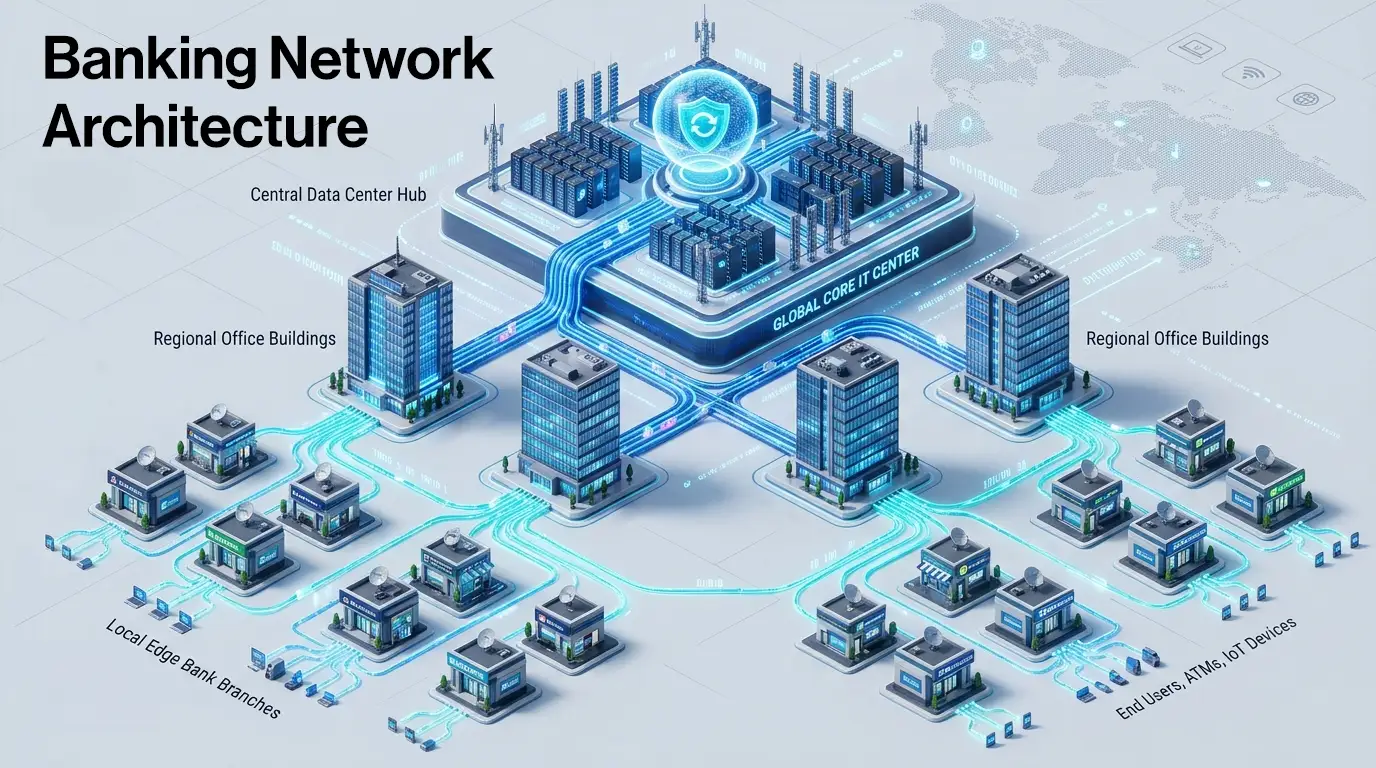
Behind every bank's daily operations is a structured four-tier hierarchy: the Group IT Centre (GITC), the Local Head Office (LHO), the Regional Office (RO), and the Branch. Each tier has its own wired and wireless infrastructure; switches, access points, firewalls, and authentication systems, designed to connect bank employees, in-house developers, and guests to the network securely. For IT leaders in banking, understanding what each tier needs and how the network at each location is structured is the foundation of every sound infrastructure decision.
A Bank Is Only as Reliable as Its Network
Banking is fundamentally about trust, and today that trust hinges on network infrastructure.
When a staff member logs in at the start of the day, pulls up a report, joins a video call, or prints a document, each of these actions depends on a LAN that is structured, secure, and consistently available. When a developer at the IT centre connects to their work environment, or a visitor authenticates on guest Wi-Fi, the same network has to handle all of it, reliably and without friction. A poorly designed access network isn't just an inconvenience. In banking, it's a compliance and operational risk.
Yet for all the conversation about new technology investments, the access network, the switches, access points, firewalls, and authentication servers that connect employees and guests to systems inside each location rarely get the attention it deserves.
This is an attempt to change that.
Why Banks Organise Their Network Into Tiers
Banks don't operate from a single location. A large public sector bank in India might run over tens of thousands of branches, multiple regional offices, dozens of zonal hubs, and one or two central data centres, each of which needs its own local network for the people and devices working there.
A flat network, one where every location connects directly to a central point, would be unmanageable at this scale. It would create bottlenecks, security gaps, and operational chaos.
Managing that scale requires structure. So, banks organise their network presence into a four-tier location hierarchy, a model where each tier has a defined set of functions, and the network infrastructure at each site is designed to serve the staff and devices operating there.
That hierarchy has four tiers: GITC, LHO, RO, and Branch.
Tier 1: Group IT Centre, GITC — The Central IT Brain
From the networking point of view, the GITC (Group IT Centre) is the bank's central nerve system. It is home to the authentication infrastructure, security systems, and network management platforms that govern every other tier below it.
To be specific: GITC hosts servers and the intelligence of the network. The centralised Wi-Fi controller that manages access points across thousands of branches sits here. The network management system that monitors every switch, firewall, and access point in real time, across the entire bank runs from here. The AAA platform that authenticates every guest, contractors, consultants, and developer connecting to the network is hosted here.
For banks, there is one non-negotiable aspect of this setup: the controller must be on-premises as mandated by RBI's IT framework and data sovereignty requirements. The on-premises model gives banks complete ownership of their network configuration with cloud deployment available where policy permits.
What the GITC Must Get Right
- Network Visibility without blind spots- every node, every device, every alert in a single dashboard
- Centralised authentication and access control who can connect, from where, and with what level of access
- Security at scale traffic inspection and segmentation at the scale of an enterprise bank
- Zero tolerance for downtime the GITC going dark means the entire network loses its command centre
Tier 2: Local Head Office, LHO — The Zonal Hub
Where Scale Meets Reliability
Below the GITC sits the LHO (Local Head Office). In large banks, the LHO covers an entire state or geographic zone. It is a substantial operation in its own right; multiple floors of office space, hundreds of staff, and significant device density.
Inside the LHO, the network's job is to connect every staff device- wired or wireless - reliably and securely. Access switches handle wired connections for PCs, printers, and IP phones. Aggregation switches consolidate traffic from multiple access switches within the building via high-speed fibre ports. Wi-Fi access points provide wireless coverage across the floors. A local firewall handles traffic segmentation and security within the site.
The LHO is also a working environment, not just a transit point. Employees here need segmented VLANs, department-level access policies, and the kind of wireless experience they'd expect in a modern enterprise office. A well-designed LHO LAN absorbs that demand without degradation.
Tier 3: Regional Office, RO — The Middle Tier
The Tier That Holds the Network Together
The RO manages a cluster of branches beneath it. Field operations teams comprising auditors, relationship managers, and cluster heads work out of these offices. Their day-to-day connectivity experience is shaped directly by how well the LAN at the RO is designed. Yet it is often where network investment is most squeezed.
In terms of infrastructure, the RO mirrors the LHO, the same combination of access switches, aggregation switches, firewalls, and access points. The difference is scale: fewer ports, fewer access points, right-sized firewalls. The type of infrastructure is the same; the capacity is calibrated to the RO's traffic profile.
Tier 4: Branch- Edge Network
Thousands of Locations. One Consistent Experience.
The Branch is where banking happens for the customer. It is also for IT teams the most operationally complex layer to manage, simply because of scale.
A large bank may have tens of thousands of branches. Each one is a small but dense network: teller workstations, ATMs, cash recycler machines, CCTV cameras, IP phones, and increasingly Wi-Fi access points for staff and guests. All of this sits on the branch LAN, the local network that switches and access points power inside the branch premises.
Unlike LHOs and ROs, the Branch does not have an aggregation switch. The traffic volume doesn't warrant one; the branch switch connects devices locally and hands off to whatever connectivity the bank has provisioned for that site. This keeps the branch stack lean and manageable: a compact PoE-enabled switch, an access point, and a branch-grade firewall.
But lean doesn't mean unprotected. Branch networks carry higher risk; they are geographically dispersed, staffed by non-IT personnel, and frequently targeted in social engineering and physical intrusion attempts. Every device connecting at the branch, wired or wireless, must be authenticated, and traffic must be properly segmented.
How IO by HFCL Fits Into The Tiered Banking Architecture
IO by HFCL's role in a banking network is specific and deliberate: the wired and wireless LAN infrastructure at each tier.
That means access points, PoE switches, branch switches, aggregation switches, firewalls, AAA, and the NMS, the infrastructure through which bank employees, developers, and guests connect to the network inside the location.
That's a clear boundary. IO does not cater to the core banking software, payment gateways, or transaction processing. And it doesn't ask banks to dismantle what they already have. IO's switches and access points integrate natively with existing NAC platforms like Cisco ISE, Aruba ClearPass, or any RADIUS-compliant system through industry-standard 802.1X. The bank's access control policies, already approved and operational, continue working exactly as intended.
The IO portfolio is built so that each product has a defined home in the four-tier hierarchy- high-capacity firewalls and the NMS at the GITC, aggregation switches and mid-range firewalls at LHO and RO, compact branch switches and access points at the Branch. One NMS platform provides visibility across all four tiers, from the central data centre to the smallest rural branch.
This approach is already deployed at scale across some of India’s largest Public sector banks and Insurance giants, institutions that leave nothing to chance when it comes to network design.
And because IO by HFCL's products are Made in India, they align naturally with the procurement priorities of public sector banks operating under Digital India and Atmanirbhar Bharat mandates.
Conclusion: Architecture First, Products Second
The instinct in any infrastructure conversation is to jump to products , which switch, which access point, which firewall. But in banking, that instinct gets you into trouble.
The right question is always: where in the four-tier structure does this go, and what does that tier actually need?
A branch switch is not an LHO switch with fewer ports. An RO firewall is not a GITC firewall scaled down. Each tier has its own traffic profile, its own security requirements, and its own operational context. Treating them the same leads to over-engineered branches, under-protected regional offices, and IT teams managing infrastructure that was never designed for the environment it's running in.
Understanding the structure- GITC, LHO, RO, Branch, is the foundation of every good banking network decision.
Exploring a network refresh or new deployment across your bank's tiers? IO by HFCL's BFSI networking specialists can walk you through a tier-by-tier assessment of your current infrastructure. Request Network Assessment






.svg)